The Node HTTP API: Scope, Auth, and Limits
Print a receipt, read status and handle errors with the local HTTP API. Includes curl examples, authentication and network requirements.
Published 2026-09-09 · Updated 2026-09-21 · All documentation →
Use the local HTTP API to read device status, print a receipt, open a drawer or change settings. It runs on port 80 of the node's LAN address. Start with the status request below, then send the first-print example from a native client or an on-site backend.
Most responses are JSON; event streams and diagnostic downloads use their own formats. Scanner and scale routes need a suitable variant and peripheral. Camera operations belong to the camera firmware variant, not Proxy Node Raw or a retail camera product.
Start with a status read
Complete device setup, then use a terminal on the node's local network. The examples use a POSIX shell; replace the hostname with your node's hostname or IP.
curl --fail-with-body http://proxynodes-pn-7f3a.local/statusThe response identifies the running firmware and peripheral state. Read
GET /peripherals to find the endpoint IDs your commands should address. A declared
endpoint is not proof that its device is physically connected.
Common routes
This is a starting reference for local integrations, not a list of every firmware route. Availability of scanner, scale and camera operations depends on the device variant.
| Method and path | Purpose |
|---|---|
GET /status | Device identity, printer state and diagnostics |
GET /peripherals | Declared peripheral endpoint IDs |
POST /print | Print structured receipt lines |
POST /raw | Send base64-encoded printer bytes |
POST /drawer/kick | Pulse a drawer connected through the printer |
GET /events | Subscribe to server-sent events |
GET /scans | Read the barcode scan log |
GET /scale | Read the scale state |
GET /config, PUT /config | Read or patch device configuration |
GET /network, PUT /network/ipv4 | Read network state or replace fixed IPv4 settings |
GET /bootlog | Read startup and crash information |
Read routes remain unauthenticated. Configuration writes require an API key in
admin and strict modes; print, raw and drawer commands require one in strict.
Use X-PN-Api-Key, not a bearer token. See authentication.
This example sends a small receipt to the usual receipt endpoint. Check the endpoint
ID using GET /peripherals first. Add -H 'X-PN-Api-Key: <your-key>' if required.
curl http://proxynodes-pn-7f3a.local/print \
  -X POST -H 'Content-Type: application/json' \
  -d '{
    "type": "print",
    "id": "first-receipt-1",
    "endpoint": "receipt",
    "lines": [
      { "type": "banner", "value": "ORDER", "align": "center" },
      { "type": "text", "value": "Table 4", "bold": true, "size": "2x" },
      { "type": "barcode", "symbology": "qr", "value": "ORDER-1042" },
      { "type": "cut" }
    ]
  }'
The command requires type, a nonempty id, endpoint and lines. The response's
commandId echoes your ID for correlation; it is not an idempotency key. Replaying
the request can print another receipt. After a timeout or write_failed, inspect the
printer before sending it again. See error handling.
Seven line types cover text, banners, rules, feeds, cuts, barcodes and 1-bit rasters.
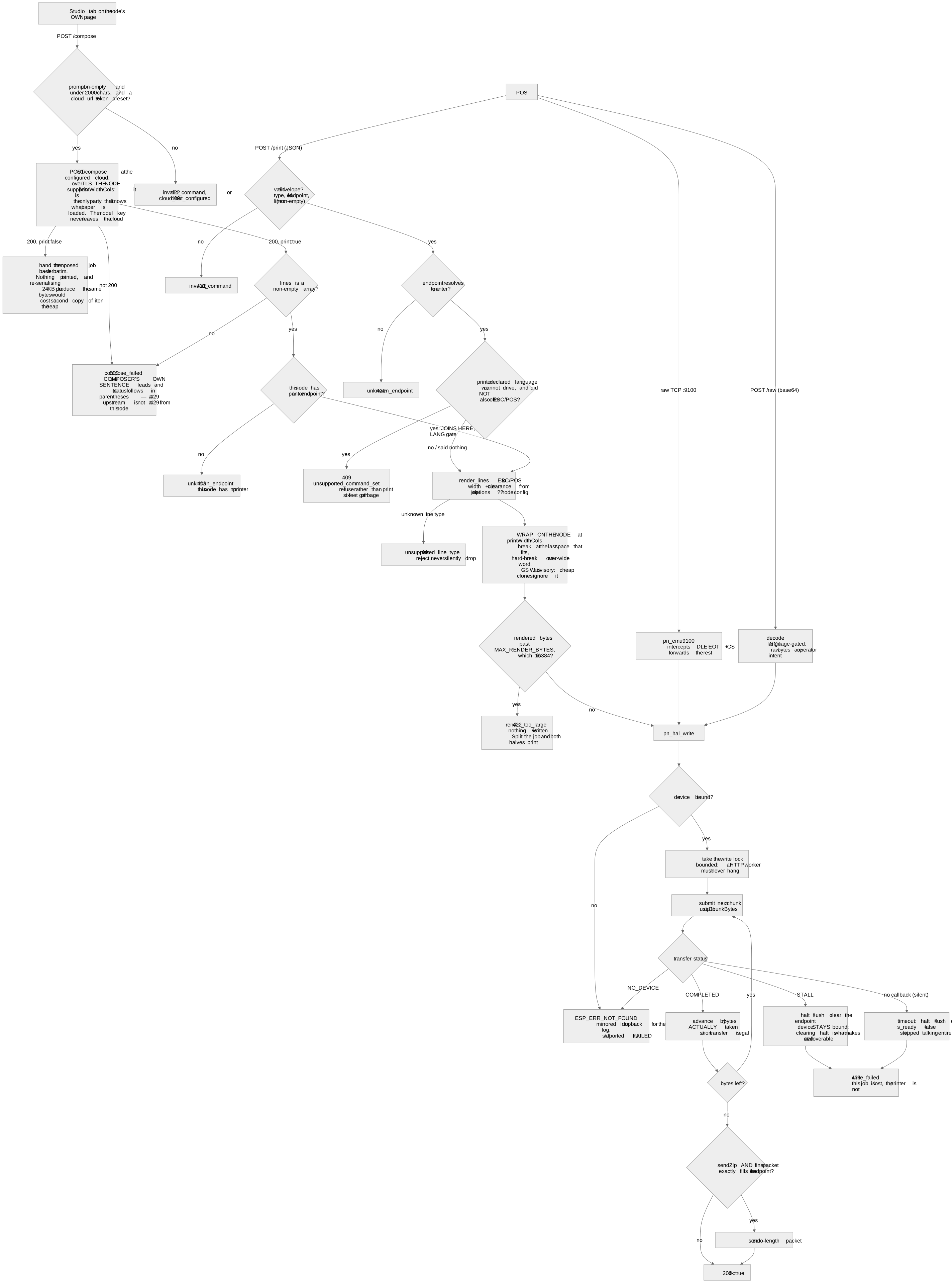
Text wraps at the configured printWidthCols, not an automatically measured paper width.
Check the printer's ruler receipt and configure the width before using a receipt template.
How a print job reaches USB
The limits worth knowing up front
These are the ones that change how you write the client, and every one of them is a refusal rather than a silent clamp:
- A print job renders into a bounded buffer. A job that renders past it is refused with nothing written, because a truncated receipt looks finished.
- Raw bytes are capped at 8,192 decoded bytes per request — past that is
422 render_too_large— and bad base64 is refused. - The event stream has four slots. A fifth subscriber is refused with
503 no_slots, and the check runs before the stream preamble is written — it used to answer200 OKand then be permanently silent while holding a socket. Browser tabs on the node’s own page consume the same four slots, which is why a poll route exists for weight and why webhooks exist for events. - The camera streams to one client at a time, and refuses a stream when fewer than two event slots are free.
- A config write is strict: an unknown key is refused rather than ignored, so a typo cannot read as success.
- A fixed IPv4 address replaces rather than patches. Every other write on this API is a partial patch; that one starts from empty and fills only what the body carried, so omitting the DNS server erases it. It takes effect on the next boot and says so — re-addressing a live interface drops every socket on it, including the one carrying the response.
Fixed IP address
PUT /network/ipv4 replaces the saved IPv4 configuration, unlike a partial config patch.
Ask your network administrator for a free address, netmask, gateway and DNS server.
Omitting a field clears it; an empty object returns the node to DHCP on its next boot.
curl -X PUT http://proxynodes-pn-7f3a.local/network/ipv4 \
  -H 'Content-Type: application/json' \
  -d '{"address":"192.168.86.40","netmask":"255.255.255.0","gateway":"192.168.86.1","dns":"192.168.86.1"}'
These are example addresses, not values to copy onto another network. Add the API-key header on a locked node. The change takes effect on the next boot; then reconnect using the new address.
Read the printer state
This is an excerpt from a status response; other fields are omitted:
{
  "identity": { "deviceId": "pn-7f3a", "variant": "wifi" },
  "online": true,
  "printers": [{
    "endpoint": "receipt", "online": true,
    "paperOut": false, "coverOpen": false, "drawerOpen": false
  }]
}
The interesting part is what happens when a reading cannot be taken. A printer with no status channel can never report paper state, and that is a property of the device rather than a fault — so the driver layer models it as unknown rather than as "no faults". It still reports itself online, because it is plugged in and printing. Status separates a peripheral that was never plugged in, one refused for want of a USB channel, one seen and gone with an age, and one bound and silent, because those four need different actions from whoever is standing in front of it.
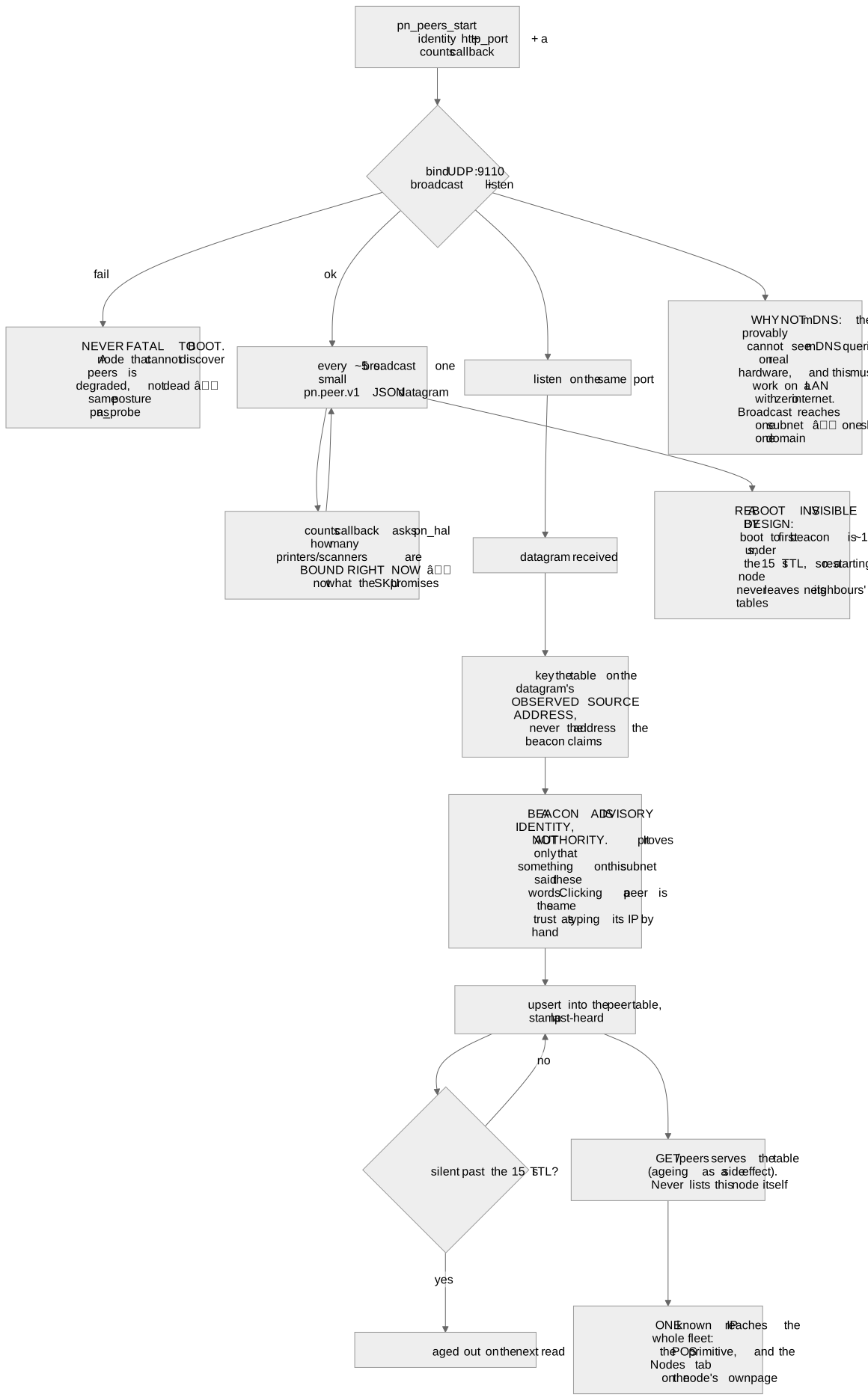
Discovery, and finding the rest of the fleet
Nodes advertise over mDNS, so proxynodes-<id>.local resolves on the LAN without anybody typing an
address. They also beacon to each other over UDP and serve a peer list, which means one known
address reaches the whole fleet.
Two things people expect and do not get
There is no remote access to a node, and none is planned. No NAT traversal, no tunnel, no hosted path for print jobs. Everything on this page happens on the network the node is plugged into. That is the product, not a limitation of it.
A node you give a cloud token to does reach out: it sends heartbeats, and it pulls its own firmware updates unattended under the update policy on your account page. That traffic starts at the node, and nothing on that path can write the node’s configuration — remote firmware updates, yes; remote configuration, no.
Port 9100 has no authentication and cannot have any. It is a socket carrying printer bytes; there is no header, handshake or envelope anywhere in that protocol to put a credential in. It is protected by network segregation or it is not protected. Plan the segment.
Where to go next
- Error codes — the complete vocabulary with retry advice. Read this before you write your first error branch.
- Auth — the three tiers, the header, and the firmware credential.
- Webhooks — the node calling you, and the honest delivery guarantees.
- Hardware variants — which endpoints a given SKU declares at all.
- The simulator — the same API on your laptop, with fault injection.
Frequently asked questions
- Can I get the full route list?
- Start with the common routes above and the linked authentication, error and webhook references. The node does not expose a route-list endpoint. Read /status for its running firmware and /peripherals for endpoint IDs; an unknown path returns 404 and an unsupported method returns 405.
- Do I have to use the JSON API at all?
- Software with configurable raw ESC/POS network printing can be evaluated on port 9100. Test your actual printer and POS version; this does not establish named-POS compatibility. Raw drawer pulses are filtered, so use POST /drawer/kick separately or record the drawer as unavailable. The JSON API also provides structured status, scans, weight and configuration.
- Does anything in the print path need the internet?
- No, with exactly one exception, and it is named on this site wherever it comes up: composing a receipt from a description relays to a hosted model, so that feature needs a connection. Printing, status, the drawer, scans and weight never do.
- Is the JSON contract versioned?
- The shapes are typed in one shared package that firmware, the twin, the tooling and this site all compile against, and a contract check holds the firmware's strings to it. The `error` field is deliberately an open string rather than an enum so a node that is newer than your client does not fail validation.
- How do I test without hardware?
- Run the digital twin. It serves the contract routes — printing, the drawer, raw bytes, status, events, config, camera, capture, peers, cloud and update — plus port 9100 and the same telemetry, and it can inject faults (paper out, cover open, offline) that you cannot schedule on a real printer. It is not the whole API. GET and DELETE /scans, GET /scale and GET /devices/unknown answer in the device's shapes, but the twin's scan log never records a rejected read and its /devices/unknown always reports nothing present; it has no /bootlog, /network, /network/ipv4, /compose or /restart at all, and answers those with a 404; and it does not enforce apiMode, so a request a locked node would refuse with 401 api_locked succeeds on the twin.
Still stuck? Contact support with your node model, firmware version, and what happened. Include an error code if you have one.
Related reading
- Integration Requirements for Proxy Node RawCheck the board, printer, cables, software and local network needed for a Raw integration, including POS and cash-drawer limits.
- Node API Error Codes and Retry AdviceLook up local API errors and recovery steps. Learn when to retry and when a print may already have reached the printer.
- Node API Auth: open, admin, and strictHow a node is locked down: the three apiMode tiers, the X-PN-Api-Key header, the separate update key, and the 15-second button hold that clears both.
- Node Webhooks: Push Events to Your POSReceive local device events over HTTP, verify their HMAC signature and handle delivery failures.
- Firmware Variants: What Each Build DeclaresIdentify the firmware variant for your board and understand update compatibility, hardware capabilities and qualification limits.