Node Webhooks: Push Events to Your POS
Receive local device events over HTTP, verify their HMAC signature and handle delivery failures.
Published 2026-09-09 · Updated 2026-09-21 · All documentation →
A node can POST device events to a receiver you control. Use this for prompt updates without keeping an event-stream connection open. Delivery is best effort: events can be lost or delivered twice, so the receiver must handle both outcomes.
Configure a receiver
Run an HTTP receiver reachable from the node, then update its configuration. Replace
the example addresses and secret. Add X-PN-Api-Key when the node's access mode requires
it; see authentication.
curl --fail-with-body -X PUT http://192.168.86.34/config \
  -H 'Content-Type: application/json' \
  -d '{
    "webhook": {
      "url": "http://192.168.86.20:8099/pos/hook",
      "secret": "replace-with-a-random-shared-secret",
      "events": ["scan_read", "printer_status"]
    }
  }'
Use a secret generated for this receiver, and protect the configuration request: the local API uses HTTP. A restricted LAN receiver can operate without internet access; a remote receiver depends on the network path to that service. HTTPS webhook targets use certificate verification. Plain HTTP signs the body but does not encrypt it. Redirects are not followed, so configure the final URL directly.
The URL is used exactly as supplied. An unknown event name causes a 422 response.
A changed URL clears the stored secret unless the same request supplies a new secret.
An empty secret explicitly disables signing. Reading the configuration reports
secretSet, never the secret itself.
Choose events
These names match the type values on GET /events. A new configuration defaults to
scans and printer status. Omitting events from a later patch keeps the existing selection.
| Event | Default | Meaning |
|---|---|---|
scan_read | Yes | An accepted barcode read. Refused reads remain in the scan log and are not pushed |
printer_status | Yes | A periodic printer-state report, approximately every five seconds when a printer endpoint is declared. Compare it with your last reading to detect changes |
scale_weight_changed | No | A weight update. Use GET /scale if polling fits your application better |
command_result | No | The result of a print, raw-write or drawer command |
camera_frame_captured | No | A frame was captured on a device with camera support; Raw does not include a camera |
Request format
POST /pos/hook HTTP/1.1
Content-Type: application/json
X-PN-Node: pn-d938
X-PN-Seq: 42
X-PN-Signature: sha256=<64 hexadecimal characters>

{"node":"pn-d938","seq":42,"uptimeMs":1157,"event":{"type":"scan_read","endpoint":"scanner","value":"ORDER-1042","seq":17}}
There are two sequence numbers. The outer seq identifies a queued webhook across
all subscribed event types. A scan's event.seq identifies its record in GET /scans.
They are independent: outer webhook 42 can carry scan 17. Do not use X-PN-Seq as a
scan-log cursor.
Verify the signature before using the event
X-PN-Signature contains HMAC-SHA256 over the exact request-body bytes. Capture those
bytes before a JSON body parser changes them. This Node.js helper rejects a missing,
empty, malformed or incorrect signature:
import { createHmac, timingSafeEqual } from "node:crypto";

export function verifyWebhook(rawBody, signature, secret) {
  if (!Buffer.isBuffer(rawBody) || typeof secret !== "string" || !secret.length) {
    return false;
  }
  if (typeof signature !== "string" || signature.length !== 71 || !/^sha256=[0-9a-f]{64}$/i.test(signature)) {
    return false;
  }
  const supplied = Buffer.from(signature.slice(7), "hex");
  const expected = createHmac("sha256", secret).update(rawBody).digest();
  return timingSafeEqual(supplied, expected);
}
Limit the incoming HTTP body size before calling the helper. Parse and validate the
JSON only after verification. Check that the signed node matches the device expected
for that secret, and use the signed body fields for processing. The node and sequence
headers are convenient hints; they are not themselves covered by the body signature.
A node without a configured secret sends sha256=. A receiver requiring signed events
must reject it. Never accept a request merely because its signature header is present.
A valid signature does not prove a new event
An old signed body can be replayed. There is no signed wall-clock timestamp or boot ID. Sequence and uptime are 32-bit values that restart or wrap; lower uptime alone does not authenticate a reboot. Track duplicates in your receiver, keep replay records as long as your application requires, and reconcile ambiguous restarts through a trusted operational process. Do not use this webhook alone to authorize irreversible actions.
Delivery limits
| Limit | Current firmware behavior |
|---|---|
| URL | At most 199 UTF-8 bytes; longer values are refused |
| Secret | At most 63 UTF-8 bytes; longer values are refused |
| Event JSON | At most 511 bytes; larger events are dropped and counted |
| Queue | 8 events in RAM; when full, the oldest queued event is dropped |
| Request | Five-second HTTP timeout setting; one request in flight |
| Success | A 2xx response completes delivery |
| Refusal | A 4xx, including 429, is not retried |
| Other result | One immediate retry, then the event is dropped and counted |
The two attempts carry the same body and signature. If your receiver processes the first attempt but its response is lost, the retry can deliver the event again. Deduplicate processing and return success for an already accepted event. Neither at-most-once nor at-least-once delivery is guaranteed. Queue contents do not survive a node reboot, and the node does not send a later backfill.
Recover missed scans while they remain available
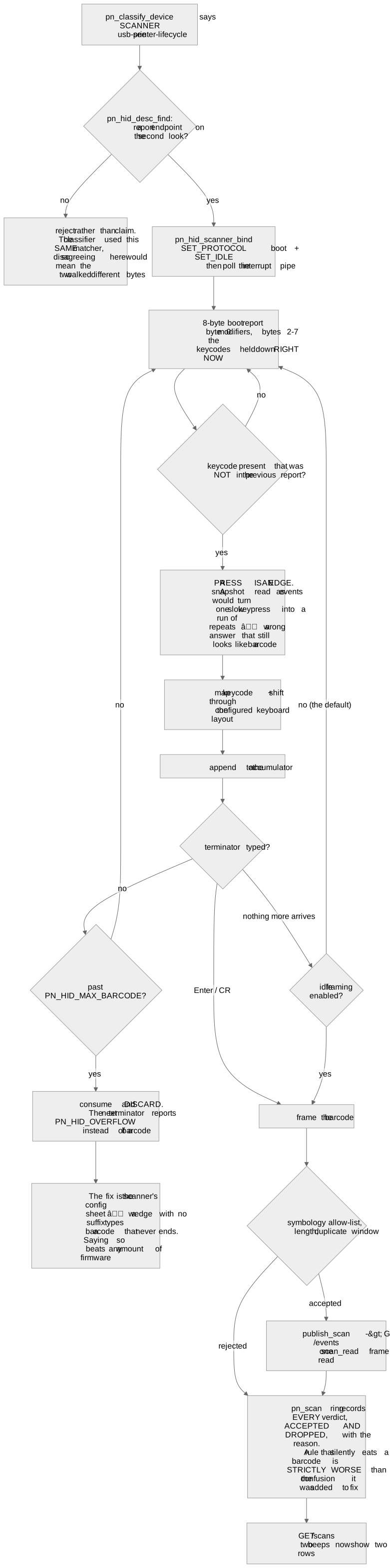
GET /scans contains a 12-record RAM ring, including accepted and refused scans.
Use a scan's event.seq to compare it with the seq in each scan-log row. A scan-sequence
gap can include refused reads, so inspect the verdict before using a recovered value.
Poll promptly when reconnecting or when you detect a gap. Older reads are overwritten
when the ring fills, and a restart clears it. The ring cannot guarantee recovery after
an outage or replace your application's durable transaction record. Other webhook event
types do not have a replay log in /scans; read the relevant current state and handle
an unknown earlier outcome explicitly.
How barcode reads become scan-log records
Check delivery health
Read the webhook status in GET /status: delivered, dropped, queued, seq,
lastStatus and lastAttemptAgoMs. A 2xx counts a delivery acknowledged by the receiver,
not proof that its downstream business action completed. lastStatus: -1 means no HTTP
status was received; it does not distinguish a failed connection from a lost response.
Inspect receiver logs alongside these counters rather than diagnosing from queue length alone.
The simulator accepts webhook configuration but does not deliver outbound webhooks. Test your receiver locally with signed fixtures, then verify actual delivery and failure handling on the intended node and network.
Frequently asked questions
- Can I configure several receiver URLs?
- No. Configure one URL per node and fan out after verification in your receiver if needed.
- Can events arrive twice?
- Yes. The node retries once after a non-2xx result other than a 4xx. If the first request was processed but its response was lost, the retry repeats it. Make receiver processing idempotent.
- Can I recover every missed scan?
- No. GET /scans retains 12 recent accepted or refused reads in RAM. Older reads are overwritten and reboot clears the log. Compare event.seq, not the outer webhook sequence, and record important transactions in your own durable store.
- Should I use webhooks or the event stream?
- Use webhooks when your software can accept HTTP requests. Use GET /events for a live connection, remembering its four-subscriber limit. Neither option is a durable event log.
- Does delivery require the internet?
- A receiver on the same working local network does not require internet access. Delivery to a remote service requires connectivity to that service.
Still stuck? Contact support with your node model, firmware version, and what happened. Include an error code if you have one.
Related reading
- The Node HTTP API: Scope, Auth, and LimitsPrint a receipt, read status and handle errors with the local HTTP API. Includes curl examples, authentication and network requirements.
- Node API Error Codes and Retry AdviceLook up local API errors and recovery steps. Learn when to retry and when a print may already have reached the printer.
- Quickstart: From Box to First ReceiptConnect Proxy Node Raw, join Wi-Fi, check the printer connection and send a first receipt. Includes setup without a printer attached.