Firmware Variants: What Each Build Declares
Identify the firmware variant for your board and understand update compatibility, hardware capabilities and qualification limits.
Published 2026-09-09 · Updated 2026-09-21 · All documentation →
This reference is for integrators and firmware maintainers. For an ordinary Raw installation, start with setup. A firmware variant determines which peripherals the device exposes; it does not establish that a hardware combination is qualified.
Keep the image assigned to your device unless support directs you to change it. A node can boot successfully with a variant that does not expose the peripherals you need.
A variant is not a product
A variant is an endpoint table in Nodeware, the firmware. It is not a board, it is not necessarily buildable, and it is not for sale. Two products exist, and neither is named after a variant:
- Proxy Node Raw is the bare-board product; current availability is on its product page. It is a bare XIAO ESP32S3 board, and it runs the
station-hubvariant — so a printer alone works, and a scanner or scale added through a powered hub has an endpoint to land on. - The Station Hub is our own board and enclosure, planned for a paid presale; check its product page for availability. It has no firmware variant yet. When it gets one, that variant will have its own id.
The station-hub variant is not the Station Hub. The id is a value on the wire — the update
system and device records both key on it — so it keeps the name it had before the product did.
The six
| Variant | What it assumes | What it declares | What a wrong image costs |
|---|---|---|---|
wifi | USB host, USB-C power. The front counter, and the base build | Receipt printer and cash drawer | On a board with a hub, the scanner and scale are enumerated and then discarded |
station-hub | USB host, with a powered hub for more than one peripheral. The build Proxy Node Raw runs | Printer, drawer, scanner, scale | On a wifi board nothing breaks — the extra endpoints never bind. This is the harmless direction |
poe-ethernet | USB host, wired Ethernet with magnetics. The kitchen line | The same pair as wifi | Endpoint behaviour identical to wifi, so a swap between the two is invisible on the wire. It still stamps the wrong variant into the image, which is what the cross-flash guard reads |
sense-camera | A camera-equipped XIAO ESP32S3 Sense with an OV3660 sensor. The USB host stack still compiles, but nothing is declared on it | A camera, and nothing else | On any other board the node declares a camera that is not wired. On this board a non-camera image declares USB peripherals that nothing is wired to, and no camera. Those two states need different fixes, which is why they read differently |
wifi-c5 | Different silicon: dual-band 2.4 and 5 GHz radio, and no USB host | Nothing — it declares no peripheral endpoints | It is the only variant that can be true on that chip. On the usual silicon it would declare no peripherals at all, so a printer physically bound to the node would have no endpoint to address |
serial | RS-232 rather than USB. The host stand | A scale over a serial line | In development. No build of this variant has ever existed on any branch, and there is no scale binding for it either. Do not plan against it |
Build coverage is a software check, not a peripheral qualification. The public compatibility page separates measured hardware results from advertised identities and work still in development.
What the variant actually changes
One table, and everything downstream follows from it:
- The node’s identity, status and config all report which variant they are.
- The node’s own web page builds one card and one tab per declared endpoint. A peripheral the variant does not declare has no card, which looks exactly like a peripheral nobody plugged in.
- The channel budget uses the variant to decide which peripheral loses a USB channel when the bus runs out.
- The scan and weight paths return nothing on a variant that declares no such endpoint, and reads are dropped.
That last point is the whole failure mode. The driver still binds the device. The classifier still identifies it. The decode still runs. The result has nowhere to go.
When the bus runs out
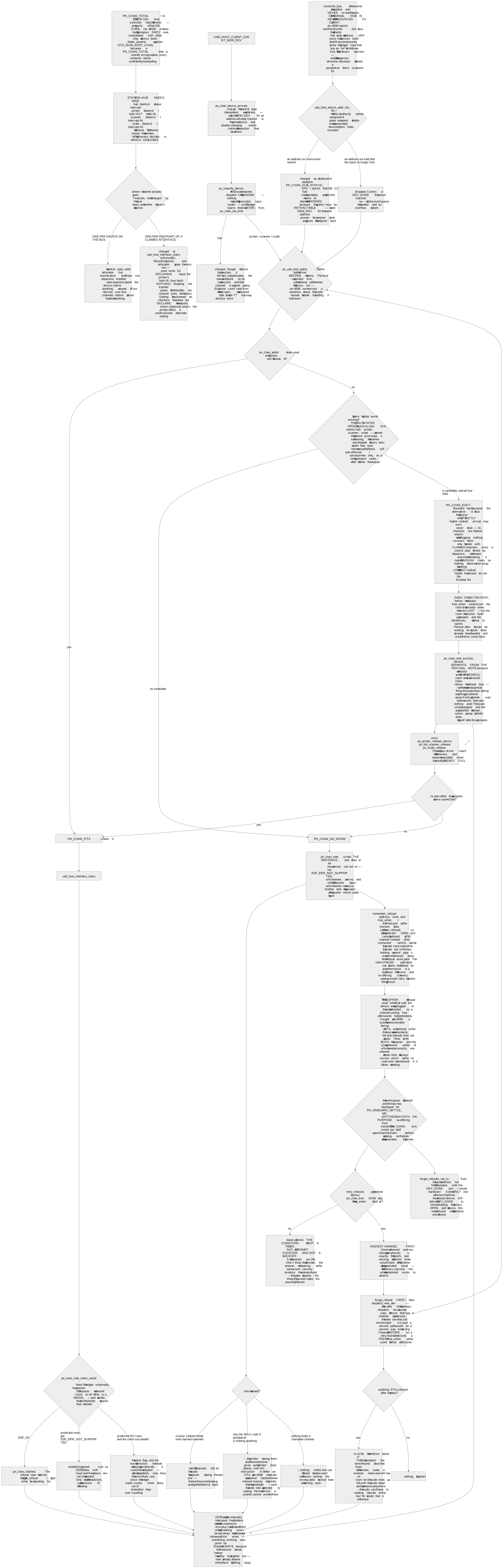
The station-hub variant declares more peripherals than the ESP32-S3 has USB host channels for.
A hub, a printer, a scanner and a scale need nine, and the chip has eight. That is not an
oversight, it is a budget, and it is resolved by a stated priority — printer, then scanner, then
scale — rather than by whichever device enumerated first. On Proxy Node Raw that makes a printer
and a scanner, or a printer and a scale, the most the channel budget allows behind a hub. That is
the budget's limit, not a qualified setup: the hub arrangement has not yet been qualified on our
bench.
If you need more USB ports than that budget allows, that is one of the reasons the Station Hub exists: its design has at least two powered USB-A ports on its own board. See the Station Hub presale for what is committed and what may still change.
The camera variant, and its one hard limit
A camera-equipped board joins the fleet like any other node, advertises a camera peripheral, and serves JPEG frames and a stream over the same LAN API.
No image leaves the node
Nothing reads a number out of a picture, calls a vision model, or uploads a frame — and that is
deliberate rather than unfinished. A frame at the wrong orientation yields a plausible wrong
number: on our bench a reading of 99.120 came back as 88.150. A wrong answer that looks right is
the one failure mode this product is built to refuse, so there is no vision and no character
recognition here, and none is promised.
Two details that catch people out on that board: the sensor is an OV3660, not the part its listing implies; and the orientation is a pair of fields read as one statement, so setting a rotation without also stating the mirror clears the mirror silently. Send both.
The dual-band variant, and what "auto" does not mean
5 GHz is real on that silicon, and auto does not mean "prefers 5 GHz". Selection is by
signal, and on our measurements it chose 2.4 GHz in nineteen joins out of twenty. The shipped
default is still auto. Nothing on this site will tell you the node picks the 5 GHz band, because
on the evidence it usually does not.
That variant also has no USB host at all — the chip has none — so it declares no peripheral endpoints. It is a network node, not a peripheral node. Proxy Node Raw is 2.4 GHz only; dual-band Wi-Fi alongside USB peripherals is part of the Station Hub design.
Wired Ethernet, and the part that has not shipped
The Ethernet link is proven: a wired interface came up at 100 Mbit full duplex on its first
boot, a cabled node stayed out of setup mode entirely, the .local name resolved over the wire
alone, and failover measured 2.9 seconds cable-out to radio and 2.0 seconds back.
Proxy Node Raw has no Ethernet port. A product with one is the Station Hub, on presale, whose design includes a 10/100 RJ45 port.
Power over Ethernet is a different claim and it is in development. Nothing here has ever been powered over the cable, and PoE is not part of the Station Hub presale either. Where you see "Ethernet" on this site it means the link; if you need power over the same cable, that part is still being built.
Which one is in your hand
Ask the node — its identity response names its variant, and so does its own web page. The variant string is also what the firmware cross-flash guard reads, which is why an upload built for another variant is refused rather than accepted: an image for the wrong variant boots, serves HTTP, confirms itself, and is wrong, and rollback cannot help because the image is healthy. If you genuinely mean to change a node’s variant, the upload takes an explicit override header — see the error vocabulary for the refusal you will hit without it.
Frequently asked questions
- Which variant does Proxy Node Raw run?
- The station-hub variant, which declares a receipt printer, cash drawer, scanner and scale. With only a printer attached it behaves exactly like the base Wi-Fi build; the extra endpoints are there so a scanner or scale added through a powered hub is not silently discarded.
- Is the station-hub variant the Station Hub?
- No. The station-hub variant is firmware, and it is what Proxy Node Raw runs today. The Station Hub is a separate product — our own board and enclosure, on presale — and it has no firmware variant yet. The variant id keeps its old name because devices and the update system already key on it.
- Can I buy the camera or dual-band boards?
- No. They exist as firmware variants with real endpoint behaviour, and they are documented here so integrators can see the range and its limits, but they are not products. Proxy Node Raw is the bare-board product and Station Hub is planned for a paid presale. Check their product pages for current availability. Nothing on this page is a purchase commitment.
- What happens if I flash the wrong variant?
- Usually nothing visible, which is the danger. The node boots, serves its API and confirms itself healthy while quietly declaring the wrong set of endpoints — so a scanner is enumerated, decoded and discarded uncounted. That is why the upload path compares the variant before it opens a socket for the image.
- Does a scanner work on the base build?
- It binds, and its reads have nowhere to go, because that variant declares no scanner endpoint. Peripherals beyond a printer and drawer need a variant that declares them.
- Is the RS-232 variant coming?
- It is in development and there is no date. What exists today is an endpoint table, a mirror of it in the digital twin and a conformance assertion — no build of it has ever existed, and there is no scale binding for it either. RS-232 is not part of the Station Hub presale. It is listed here rather than hidden, and it is not something to plan against.
Still stuck? Contact support with your node model, firmware version, and what happened. Include an error code if you have one.
Related reading
- Quickstart: From Box to First ReceiptConnect Proxy Node Raw, join Wi-Fi, check the printer connection and send a first receipt. Includes setup without a printer attached.
- Troubleshooting a Node: LEDs, USB, PrintingWork through power, Wi-Fi, printer detection and print failures. Read status, recover safely and collect the details support needs.
- The Node HTTP API: Scope, Auth, and LimitsPrint a receipt, read status and handle errors with the local HTTP API. Includes curl examples, authentication and network requirements.