Troubleshooting a Node: LEDs, USB, Printing
Work through power, Wi-Fi, printer detection and print failures. Read status, recover safely and collect the details support needs.
Published 2026-09-09 · Updated 2026-09-21 · All documentation →
Start with the symptom below. For a new installation, keep the setup to one printer and use the setup guide to check the power and cable arrangement first.
Cannot open the node's page
- If you are setting up Wi-Fi, join
ProxyNodes-XXXX, stay connected despite the no-internet warning, and openhttp://192.168.4.1. This address works only in setup mode. - After setup, reconnect your phone to the normal local network. Briefly tap B and read the node's IP from the temporary Wi-Fi network name without joining it.
- Open that IP with
http://. If the IP works but the.localname does not, use the IP; discovery may be filtered by your network or unavailable on that computer. - If the name says
no-network, check that the router is available and the network offers 2.4 GHz. Guest-network isolation can also prevent your phone from reaching the node. - If the saved network name or password has changed, hold B about five seconds to forget Wi-Fi, then repeat setup. This does not clear keys or transfer account ownership.
New credentials that have never worked return the node to setup after about three minutes. Previously working credentials keep retrying through an outage.
Read the LED first
| Pattern | State | What it means |
|---|---|---|
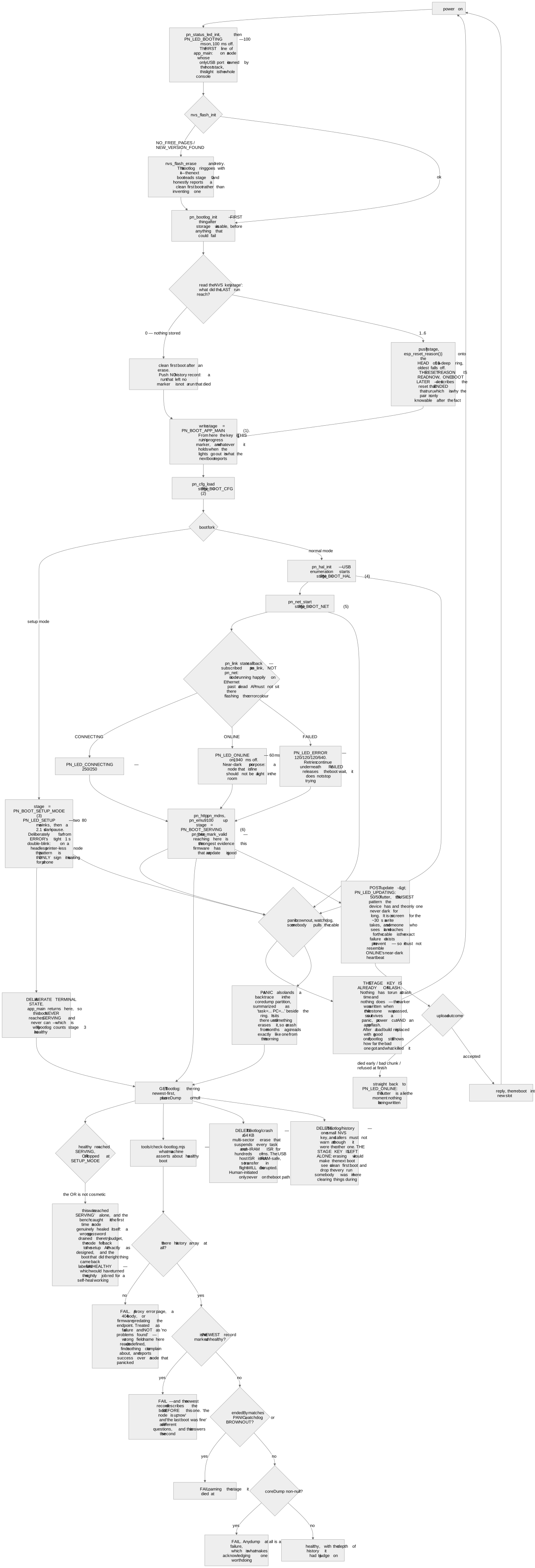
| Fast blink | Booting | Coming up. If it never leaves this, see the crash record below |
| Medium blink | Connecting | Joining Wi-Fi |
| Slow heartbeat | Online | Serving on the LAN. Near-dark most of the time — this is the healthy one |
| Rapid double-blink | Error | A fault: paper out, or no network |
| Slow double-wink | Setup | Waiting for Wi-Fi setup; join the ProxyNodes-XXXX network |
| Rapid continuous flutter | Updating | A firmware image is being written to flash. Do not pull the cable |
Then read the status
Everything below assumes you can reach the node. If you cannot, find it with a tap of the B button
— it announces itself as a Wi-Fi network whose name carries its id and current address, and says
no-network when it has none — or over mDNS at proxynodes-<id>.local. Setup covers both.
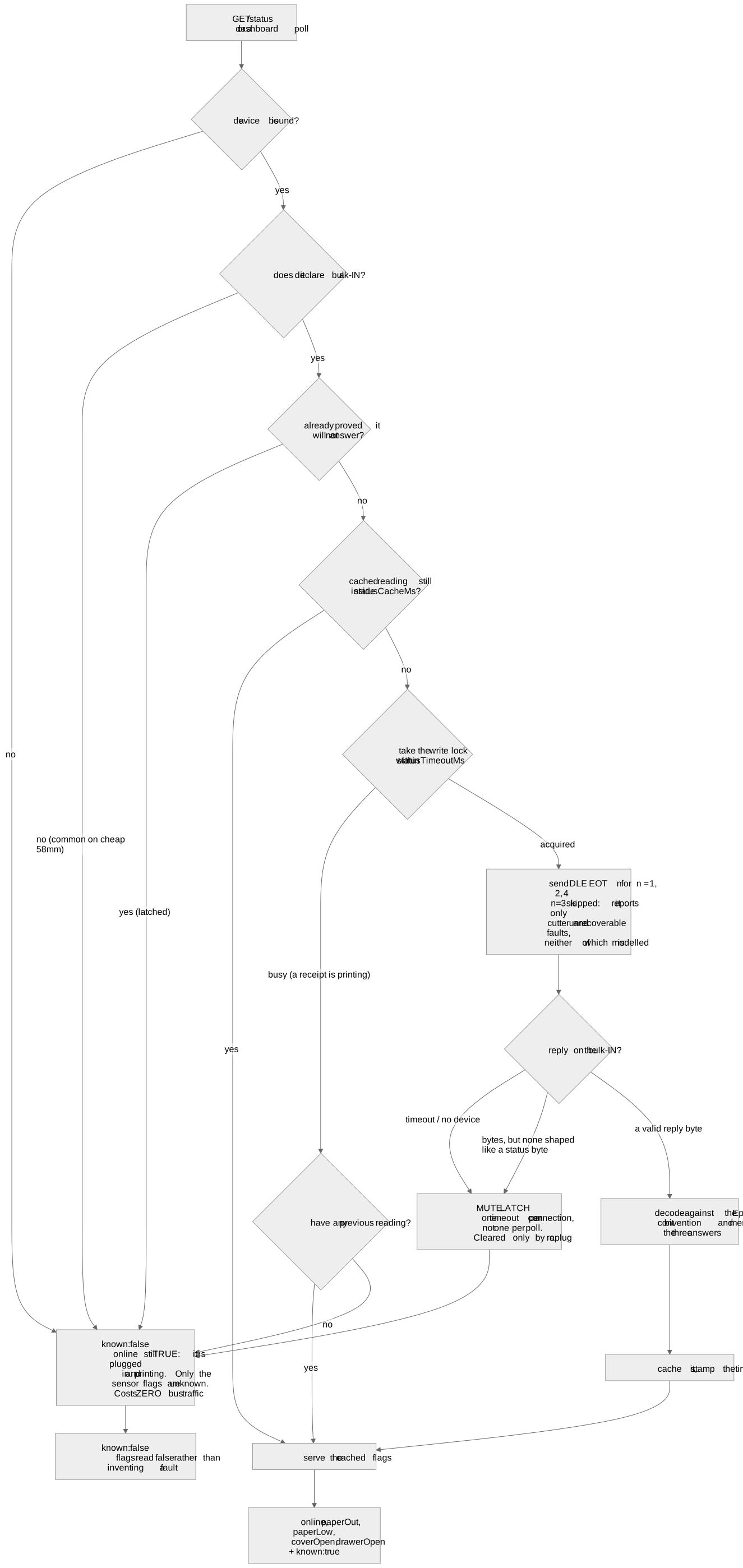
curl -s http://<node-ip>/statusThat one response carries the peripheral bindings, the USB diagnostics, the recovery state, the scale, the camera, the webhook delivery health and every printer. It is also what to paste into support — it is most of the diagnosis.
The distinction to read for is absence. Status separates a peripheral that was never plugged in, one refused for want of a USB channel, one seen and gone with an age attached, and one bound and silent. Those are four different faults with four different fixes, and a surface that collapsed them would send you to the wrong one.
Printer problems
Check the printer's own self-test, paper and cover first. Then check its connection on the node's page and press Test print once. Keep printing and POS integration separate: if the node's test works but a POS receipt does not, check the POS address, port and command language before changing USB settings.
The settings below are fields in GET /config and are changed with PUT /config or the
node's Settings page. Locked nodes need an authenticated client to save changes; see
authentication. Record the previous value and change one setting at a time.
| Symptom | Likely cause | Fix |
|---|---|---|
| No device event at all | The cable’s ID pin, or no 5 V on the printer side | Does the printer enumerate on a laptop? The board does not source 5 V — use a cable arrangement with a powered leg |
| Enumerates, but the log says no usable printer interface | A vendor-class device with the fallback off | For an ESC/POS printer under evaluation, set acceptVendorClass to true, then replug; this does not add support for another print language |
| Prints, then the node reboots | Brownout under head current | Give the node its own supply. Do not power it from the printer |
| Paper feeds, prints garbage | The printer is not speaking ESC/POS, or the wrong code page | Read the command set the printer declares about itself, on the boot slip or in status. If it names anything but an ESC/POS spelling, the node is speaking the wrong language and no tuning fixes it |
A print is refused with unsupported_command_set | Same cause, caught properly | Working as intended — it is refusing rather than wasting a roll. Raw byte pass-through is deliberately not subject to it if you want to drive the printer yourself |
| Prints blank but still cuts | Thermal paper loaded upside down | Drag a fingernail across it: the coated side streaks. Flip the roll |
| Cuts short, through the content | Too little feed before the cut | Increase cutFeedLines and test a short receipt; the correct value depends on the printer |
| The last line prints only on the next job | The printer may require a terminating zero-length USB packet | Set sendZlp to true and retest |
| Large receipts stall midway | Possible printer buffer overrun or USB transfer fault | Check power first, then reduce usbChunkBytes or increase interChunkDelayMs; inspect the paper before retrying a partly printed job |
| Status reads as unknown | The printer has no status channel | Not a fault. Plenty of inexpensive printers have no inbound endpoint and can never answer a status query — the node reports that as unknown rather than inventing "no faults" |
The drawer
A drawer reported open while it is shut, and shut while it stands open, is a polarity setting and not a broken switch. The ESC/POS status bit reports the pin level, not the drawer’s state, and which level means open is a property of how that drawer’s switch is wired — so a node cannot work it out. Set the drawer polarity in config; it applies on the next status poll, with no reboot and no re-enumeration.
Take the reading against a till somebody has closed properly, and at least three seconds after a kick. A drawer kicked from a start that was not fully latched slides far enough to look open without tripping the switch, then reads shut while standing visibly open — which looks exactly like a sense line that reports the transition and reverts. It is not.
The scale
A scale reading a steady zero that never moves has usually stopped answering. "Stable at zero" is what a decoder renders for silence, and it is the well-formed wrong number this product exists to refuse — so the node calls it out explicitly rather than showing green.
An idle scale that naps off the USB bus for hours looks the same as one whose cable was pulled, which is why the dwell before a missing scale counts as a fault has a five-minute floor and ships switched off. That floor is a hardware fact, not caution: any threshold under it fires on ordinary sleep.
A node that restarts itself with nobody near it
The node can power-cycle its own USB bus and, if the operator allows it, restart. It escalates against a bus that has stopped working: root-port cycles at 30 seconds, 2 minutes and 10 minutes — about twelve and a half minutes of ladder — then a reboot rung, capped at six cycles in any rolling hour. It announces reaching the cap rather than going quiet.
Three things that will otherwise read as faults:
- The recovery block is omitted from status entirely when there is nothing to say. Its absence is health, not a missing field.
- The reboot rung has a brake that survives a software restart: two restarts per power-on session, then refused. Only pulling the plug clears it — which is right, because the person pulling the plug is usually the person who just fixed the supply. It retires itself once the bus has been clean for a whole window.
- A node can cycle its bus because a peripheral went away, not because anything failed. That is the answer to "it cycled at 2 a.m. and nothing was broken". The status response names the reason in words — "printer gone for 180s".
You set the ceiling: report only, cycles only, or the full ladder including the restart. An unrecognised value is refused rather than silently falling back, because a node reporting a protection level it will not act on is worse than one refusing the setting.
The one fault this does not fix
The recovery ladder does not recover an under-powered bus, and we are not going to claim it does. The bench finding is the opposite: a marginal supply is stochastic, the firmware’s own port cycle never actually drops the 5 V rail on the current hardware, and only a human replugging power has recovered it. The board work that would change that is in development. If a node is cycling repeatedly and the reason names a peripheral that is physically present, suspect the supply and the cabling before anything in software.
When an API call fails
Read the response's error code before deciding what to do. 401 api_locked needs the
API key; request-shape errors need a corrected request. A 409 or 503 may describe
temporary state, but does not by itself make replay safe. A timeout or write_failed
can leave a partially printed receipt. Check the physical result before repeating a
print or drawer command; a command ID does not prevent duplicate actions.
Two are worth knowing by name because they look alike and are opposites: a refusal because a restart is already pending is transient and can stand for up to fifteen minutes, and it fires on a node nobody touched — the recovery ladder’s reboot rung holds the same gate an installed image does. A digest mismatch on a firmware upload is permanent: retrying the identical bytes never works.
The full table with a retry column is on error codes.
Still stuck
Send support the device ID, running firmware version, printer model, cable and
power arrangement, exact error, and the result of the node's Test print. Include /status
output if available. Review diagnostic output for business information before sharing;
do not send API keys, cloud tokens, claim codes or Wi-Fi passwords.
Frequently asked questions
- The node reboots itself every 15 to 30 minutes and nobody is near it.
- Check /status for the recovery reason and /bootlog for restart history. A recurring USB fault can trigger recovery restarts, but power loss or another crash can also restart the node. Check the supply and cabling before changing recovery settings.
- A print returns 200 but no paper comes out.
- Check whether a printer is actually bound. A loopback fallback can mask an unbound printer, so a job is accepted and goes nowhere. The status response tells bound from never-plugged-in from seen-and-gone; the serial log names the fallback explicitly when it happens.
- Discovery finds nothing but the IP address works.
- Multicast is filtered on that network, or the machine you are searching from has no mDNS resolver. Use the address. Discovery is a convenience, not a dependency — nothing in the print path needs it.
- The node joined once and now sits with the error pattern for hours.
- That is deliberate. Credentials that have worked even once are trusted through any outage, so a node whose access point is down keeps retrying rather than dropping into setup mode — otherwise a router reboot would strand a whole fleet in a portal. If the network really has changed, hold the B button about 5 seconds to forget it.
- Rules and layout print narrower than the paper.
- The configured column width is wrong, and it fails silently because nothing on the node can measure paper. Print a boot slip and read its ruler bars: the widest bar that does not wrap is the truth, then set that column count in config.
Still stuck? Contact support with your node model, firmware version, and what happened. Include an error code if you have one.
Related reading
- Quickstart: From Box to First ReceiptConnect Proxy Node Raw, join Wi-Fi, check the printer connection and send a first receipt. Includes setup without a printer attached.
- Node API Error Codes and Retry AdviceLook up local API errors and recovery steps. Learn when to retry and when a print may already have reached the printer.
- Firmware Variants: What Each Build DeclaresIdentify the firmware variant for your board and understand update compatibility, hardware capabilities and qualification limits.